
This article is applicable to VPS or Dedicated server owners which use Plesk (Linux) as their hosting management system.
When you host your websites with Plesk (Linux), it by default adds “X-Powered-By” response headers to each HTTP request. This problem usually is server-wide, meaning it could affect all of your websites if you have a Plesk server.
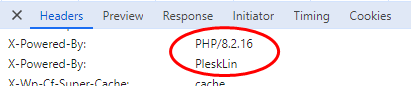
The presence of these headers is not only a security flaw (allows fingerprinting), but it also adds additional bytes to each HTTP request, when a visitor is viewing your site content. In this article you will find a server-wide solutions on how to remove these X-Powered-By headers from your websites.
Check if your server is affected by this problem
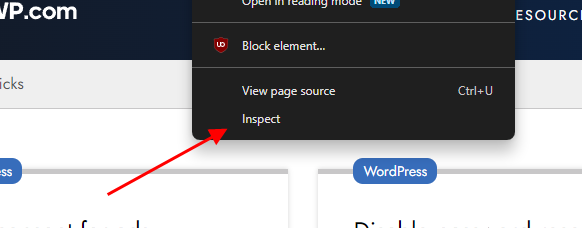
#1 Open your website via Google Chrome browser, right click on the window and press on “Inspect” – this will open up Google Chrome Developer Tools.
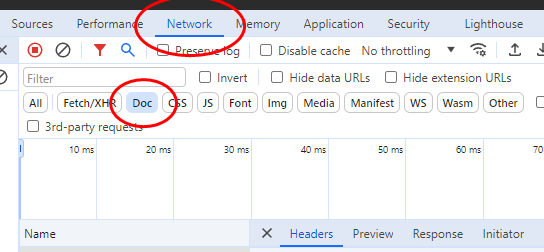
#2 Click on the “Network” tab, then choose “Doc” in the request filter and select the first HTML document loaded from your website domain
#3 Now look at the “Headers” tab of the particular request and inspect the “Response Headers” section. Look for “X-Powered-By” headers – if you see at least one of these, you know for sure – this security flaw affects you.
How to remove X-Powered-By headers from a Plesk server
Remove X-Powered-By: PleskLin header
First login to your Plesk server via SSH as a root user. For this you will need to edit the Plesk settings file (panel.ini). Use the linux command below to open this file:
plesk conf panel.iniNow, as with the usual “vi” editor, press the “INSERT” key to edit the file contents and append these lines to the file (or just the xPoweredByHeader variable under the [webserver] section if it already exists on this file):
[webserver]
xPoweredByHeader = off
Exit the editing mode by pressing an ESC key. Type in the console :wq! afterwards and press enter to save the file and exit the file editor.
As a final step – recreate the web-server configuration for domains with this command:
plesk repair web -domains-onlyRemove X-Powered-By PHP header
Log in the Plesk panel (web interface) as an administrator and go to Tools & Settings > General settings > PHP Settings or just look up the PHP Settings via search.
Now you should see a list of PHP handlers. Ensure that the ones you do not use are in a disabled state.
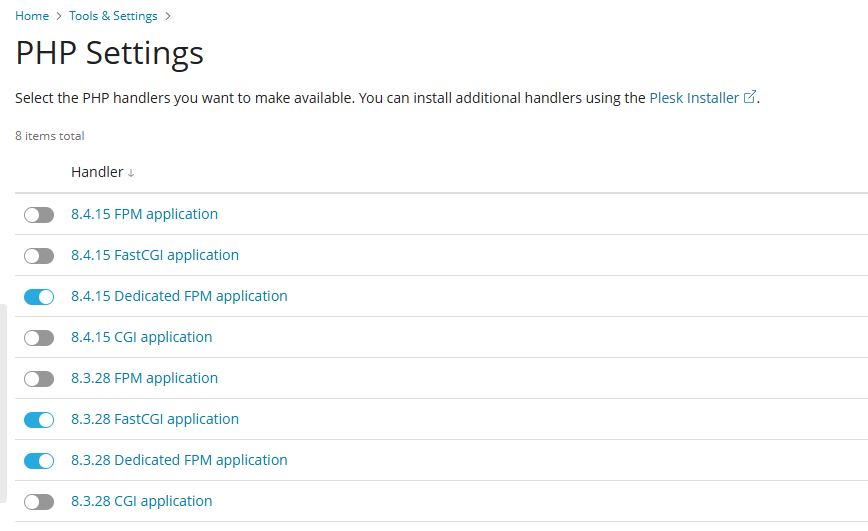
For each PHP version you want to turn the expose_php feature off, just click on one of the handlers and on the next screen click on php.ini tab. Note that PHP handlers for the same PHP version will share one php.ini file so you do not have to edit the file for each handler separately.
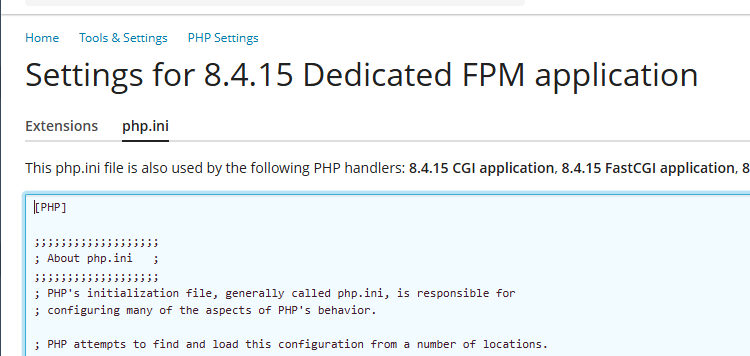
Use the browser search (Ctrl + F) to look up the expose_php configuration variable and change it to Off. Once you click on the “OK” button, the settings will be saved and applied to all websites which use the PHP handler you were editing.
References
How to remove PHP version from X-Powered-By HTTP header on Plesk server – https://support.plesk.com/hc/en-us/articles/12377322336407-How-to-remove-PHP-version-from-the-X-Powered-By-HTTP-header-on-Plesk-server
How to remove the header X-Powered-By for all websites hosted in Plesk – https://support.plesk.com/hc/en-us/articles/12377509506583-How-to-remove-the-header-X-Powered-By-for-all-websites-hosted-in-Plesk